Outlook Import Wizard
All you need to convert your emails, attachments contacts, appointments or even custom data to Microsoft Outlook in one utility. Save Time and Effort Importing E-Mails into Microsoft Outlook.
Simple EML to PST Conversion
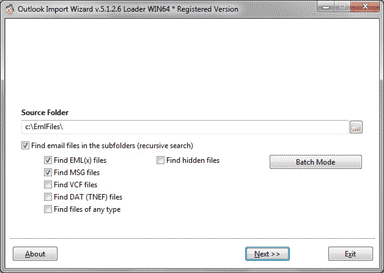
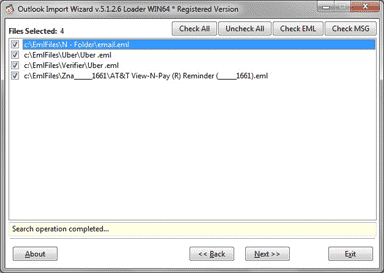
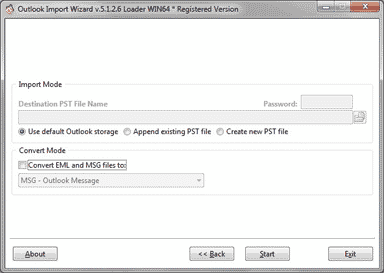
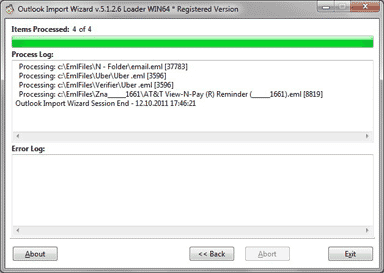
Outlook Import Wizard, [ DOWNLOAD ] an application that allows importing e-mails of .EML, .EMLX and .MSG formats saved from other e-mail clients into Microsoft Outlook or PST file with remarkable ease. Outlook Import Wizard works as eml to pst and msg to pst converter featuring built-in module for primary integrity check. It allows importing not only messages, but also attached files. And on top of it all, Outlook Import Wizard allows preserving folder structure while importing e-mails, which is particularly convenient for importing backups.
Batch Outlook Import, Encoding correction and Filtration of data
For business users who doing the email conversion and archiving on daily basis we implemented a Batch Mode. Special queue editor allows to specify source folders containing the message files and target PST. Batch queue can be saved into file and also loaded and executed to transfer email archives into several .pst files at once.
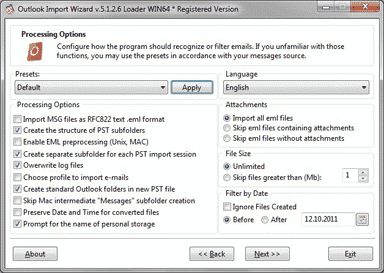
Outlook Import Wizard supports to work in couple with both 32-bit and 64-bit editions of Microsoft Outlook. Fast and accurate Outlook importing tool is powered with set of options and filters which make possible to filter emails by date, size and attached files. The Email Preprocessing Engine converts the emails encoded by the Mac OS and Unix applications on the fly.
The package also contains a bonus – a free mbox to eml converter. With help of this free utility you can extract emails from *.mbox files for future importing to Outlook.
Importing emails into Microsoft Outlook
An e-mail client is usually used as storage of essential information, including e-mails from friends, relatives, clients and business partners, important files and documents. Losing or screwing it up would be at least extremely unpleasant, that’s why a user needs to be very careful and attentive when importing messages into Microsoft Outlook. But even that can’t ensure the best result, fortunately, there is a program that can – and it’s Outlook Import Wizard.
Migration to MS Outlook
A smart tool, the program is designed to import .EML and .MSG files into MS Outlook quickly and easily, therefore it gets very simple to leave an old e-mail client for Microsoft Outlook (Outlook Express, Vista Mail, Live Mail, Windows Mail, Incredimail, Thunderbird, The Bat!, Eudora, MailCopa, Eartlink Mailbox, Turnpike, PocoMail, Berkeley Mail, Mac-Mail (Apple Mail), Entourage etc.). The program can benefit data recovery tools users, as it allows to import messages recovered into MS Outlook, which can be quite tricky without Outlook Import Wizard. The reliable algorithm employed by the app makes data loss during import impossible. And what’s more, the app takes care of the user’s security: it doesn’t interfere with antivirus scanning, which means that the messages can be scanned for viruses and the system remains protected. Outlook importing utility, imports eml and msg email files to Outlook with folders structure. Convert EML to PST format.
Outlook Import Wizard Features
Outlook Import Wizard – easy to use utility which converts eml and msg files to Outlook pst format while retaining the folders structure.
- Import e-mail files into Microsoft Office Outlook
- Import and convert file system Directories to Outlook Folders
- Import eml files into Outlook, import msg files into Outlook
- Convert eml to Outlook .pst Personal Storage even password protected
- Import archived e-mail messages saved by other programs
- Convert .eml to .pst, convert .msg to .pst
- Create a new sub-folder for each importing session with a time stamp
- Preserve folder structure while importing files into MS Outlook
- Import eml files into default Outlook PST profile, orphaned PST file or newly created PST file
- Importing filters: limit files by size, exclude or include attachments etc.
- Importing options: create subfolders structure or import all messages to the one folder
- Option to import msg files as RFC 822 format
- Preprocessing option for emails saved from Unix and MAC OS computers.
- Installation includes free mbox to eml converter (Free mailbox converter supports: Entourage .mbox, Incredimail .imm, Mac Mail .dat, PocoMail, MailCopa .mbox, The Bat! .dat Turnpike – Berkeley Mail .txt, Thunderbird,convert mbox to pst)
- Mac OS X .EMLX files format support
- Unicode PST files support, can create .pst files more then 2Gb and 4Gb, Outlook 2007 support
- Unicode MSG files creation support till converting emails to MSG format
- Built-in email converter eml to msg, msg to eml. Convert eml files to rtf, msg, pst, html, txt.
- Import eml files to any version of Microsoft Outlook designed for Windows OS.
- Batch Processing mode {read more about Batch Mode}
- Both 32-bit and 64-bit version are included! Outlook 64-bit now supported!
- Multilanguage GUI: English, German, French, Russian, Italian, Spanish, Portuguese, Dutch, Swedish, Danish, Japanese
- NEW! Supports to import VCF contacts into Outlook or VCF to PST file
- NEW! Capable to import DAT files of TNEF format to Outlook
- NEW! Supports to import file of any format to Microsoft Outlook. Any files can be archived now to one or several PST files.
- Enjoy user-friendly interface
- Save your time taking advantage of the program’s high performance
Pricing and Availability
Outlook Import Wizard runs under Windows 7, 8, 10 and compatible with Outlook 98, 2000, 2002, 2003, 2007, 2010, 2013, 2016 and 2019. Outlook Import Wizard can be registered using Individual license – for home users and Enterprise license – for business users, extended Site license is also available. Further information on the product as well as its free evaluation copy is available from description and download pages. Free mbox to eml converter can be downloaded separately using this link: Free MBOX to EML Converter.
The registered version may have a newer version number and include additional features and functionality than provided in the trial version. Licensed users are entitled to the fully-functional copy of the software and free lifetime upgrades.
NOTE: The unregistered trial version includes registration purchase reminders. An unregistered user will be able to convert only a limited number of files. The converter is Not designed to import messages to MS Outlook Express. It is importing messages into MS Outlook, so the MS Outlook installation is required.

Outlook Import Wizard tested and reviewed by the top Download sites
The numerous software websites, computer catalogs, magazines and typographers have praised our excellent software and service. Outlook Import Wizard was reviewed by many computer magazines editors, you can find editorial reviews at the top download sites. We constantly receiving multiple feedbacks from software users and we are proud that our users highly appreciate the quality of our products and services.
Our customers also choose