Migrating email from Apple Mail into Outlook
Q. I tried using Outlook Import Wizard to import approximately 15,000 emails that were stored in Apple Mail (v4.1). The import was mostly successful but most of the emails seem to have had small parts of their contents altered. Mostly this manifests itself as characters replaced by the Equal symbol (=) in HTML emails received from users using Outlook but HTML code itself can sometimes be found, for example, replacing the Ampersand (&) symbol with =amp;. Is this a known problem and, if so, is there anything that I can do to prevent it? Is there a better way of migrating email from Apple Mail into Outlook so that such transformations do not occur?
A. Please enable the emails preprocessing option “Enable the EML preprocessing (Unix, MAC)” prior to start the importing. The “Options” button is available at the second wizard page. Just enable it and import emails to Outlook. This option will scan each message and correct th encoding in accordance with MS Windows char-set table. It will remove garbage symbols from imported emails so they will be imported correctly.
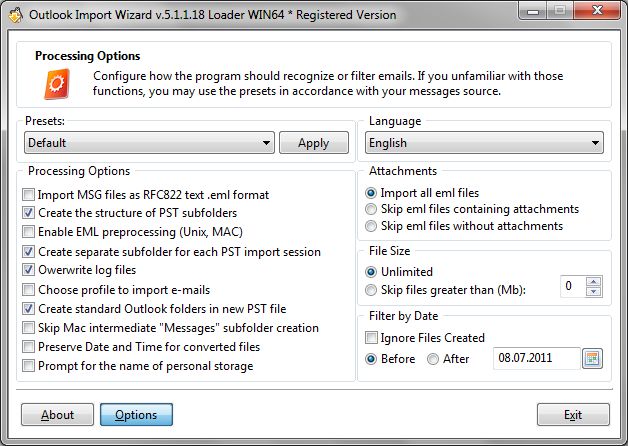
If you wish to learn more about Outlook Import Wizard options please read this article.
If you feel uncomfortable to configure each option separately, you can use one of the presets. Choose the preset for Mac OS email software, press the Apply button and confirm the options choice by pressing OK button.