Outlook export, Outlook backup
Exporting Outlook Email Contact Task Procedure Description. Learn how to extract data from Outlook profile or PST file using Outlook Export Wizard utility. The tool exports Outlook data to multiple EML, MSG, VCF files.
Outlook Import Software Instructions
- Outlook Import – Step by step description of eml to outlook importing procedure or how to move eml and msg files into MS Outlook.
- Outlook Export – Description of Outlook data extraction procedure, how to export Outlook contacts, emails, calendar, notes, attachments and other items.
- Outlook Recovery – How to repair damaged OST or PST file, convert OST to PST format.
Outlook Export
Outlook Export Wizard can help you to backup Outlook emails, contacts, notes, calendar and other items to individual files of the available format. With Outlook email extractor you may export emails to TXT, EML, MSG, HTML formats. It is easy to backup email data and use it in another email clients.
- Download Outlook Export Wizard and install it.
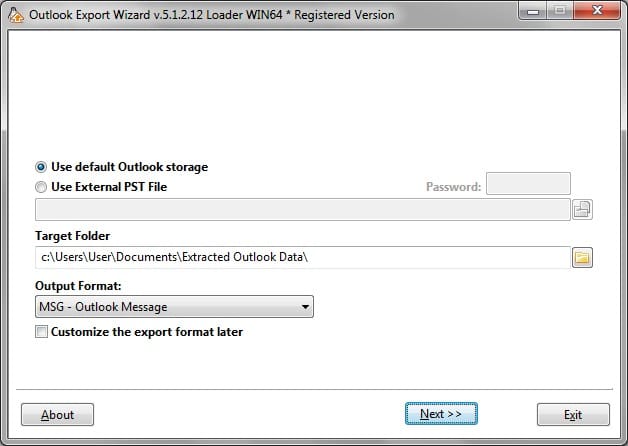
- Define the source which you want to use for exporting Outlook data. The Default Outlook Profile is selected by default, it allows to export the Outlook data of the current user profile. As alternative, you may select the option “Use External PST File” and specify the full path and PST file name. You may click the browse button and choose the file location and PST name using standard open dialog.
- Specify the target folder. Outlook Export Wizard will use that value to create exported subfolders and save extracted emails and other Outlook data. There is also the browse button for your convenience.
- Next you may set the format for all exported items or customize the format for each data type individually. If the custom option is not selected all data will be exported to files of the format which is defined in the drop box. By default it is Outlook .MSG format. Top

- Press Next button to go to the next step. Top
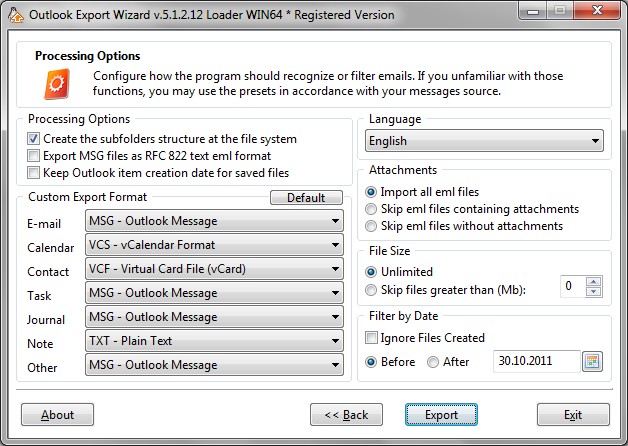
- There you may fine tune the Outlook export. First option allows you to enable or disable the subfolders creation. If the option is OFF, exported files will be saved to the output folder without subfolders creation (all in one directory). Additionally, if the custom output format option has been turned ON, you may specify the output data format for each Outlook data type. Initially it is configured by default values.
- Press Next button to start export of the Outlook data. Top
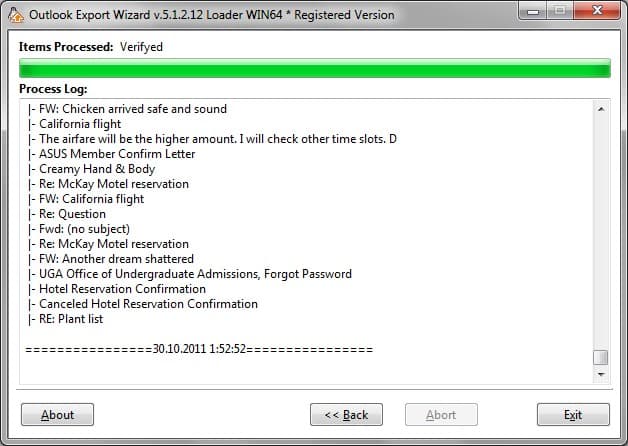
Outlook Export Wizard will save data in accordance with defined options.
Outlook Backup
Outlook data backup is simply. Extracted Outlook data can be archived and used as backup. If you would like to restore saved data (import to Outlook) you may use another solution called Outlook Import Wizard.